
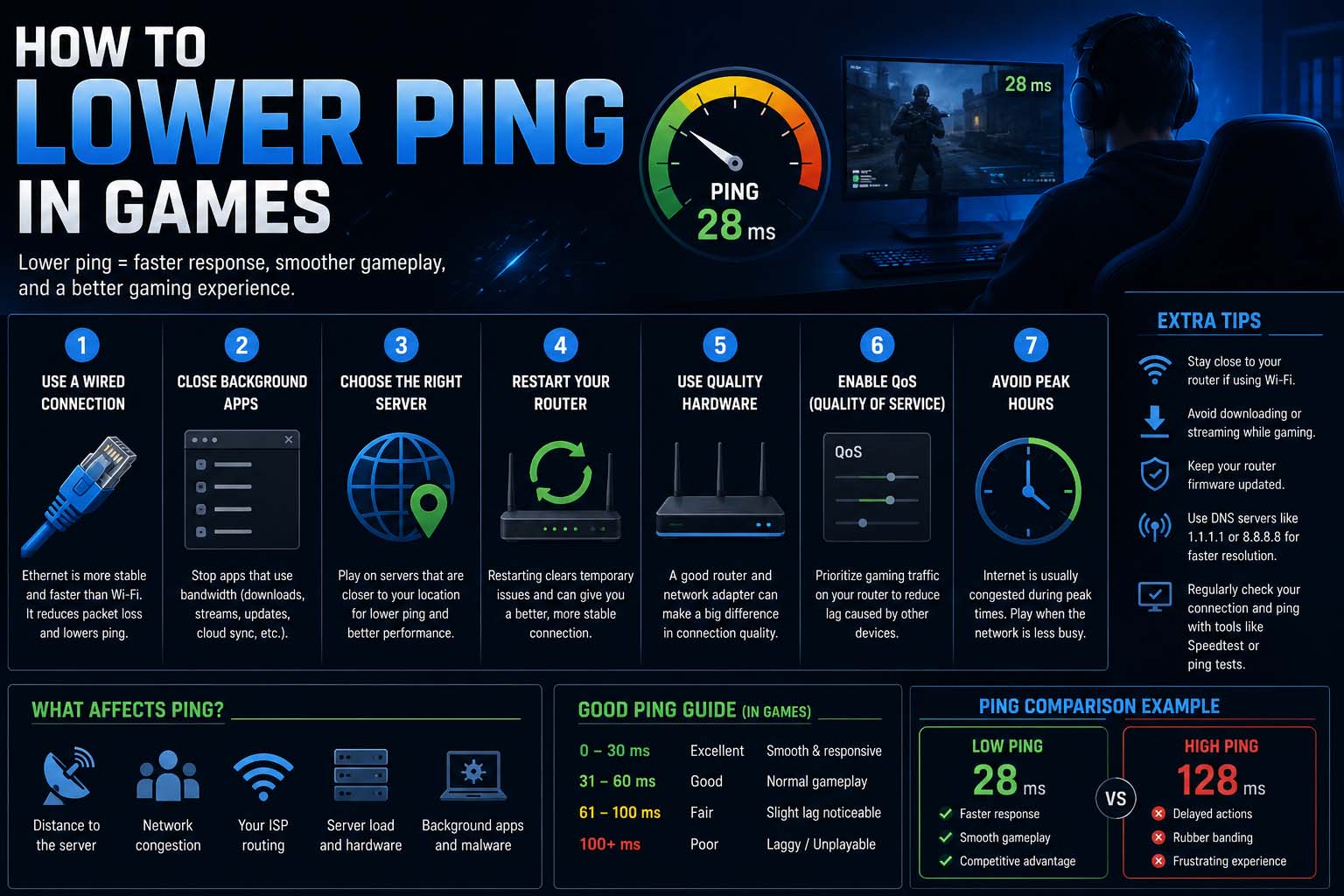
High ping can ruin even the best online gaming experience. Whether you play competitive shooters, battle royale games, MMORPGs, or sports titles, lag and delayed responses can make winning difficult.
Many gamers search for how to lower ping in games because stable connections are essential for smooth gameplay. Lower ping improves responsiveness, movement accuracy, hit registration, and overall performance.
In simple terms, ping measures how quickly data travels between your device and the game server. Lower ping means faster communication and less delay.
What Is Ping in Gaming?
Ping refers to the response time between your gaming device and the server.
Ping is measured in milliseconds (ms).
| Ping Range | Gaming Experience |
|---|---|
| 0–20 ms | Excellent |
| 20–50 ms | Very Good |
| 50–100 ms | Playable |
| 100–150 ms | Noticeable Lag |
| 150+ ms | Poor Performance |
Lower ping creates smoother gameplay and better reaction times.
High ping can cause:
- Lag spikes
- Delayed movement
- Rubberbanding
- Missed shots
- Packet loss
- Slow matchmaking response
Understanding ping is the first step toward improving online gaming performance.
How to Lower Ping in Online Games
One of the most searched questions today is how to lower ping in online games because multiplayer gaming relies heavily on stable internet connections.
There are several proven methods to reduce ping effectively.
Use a Wired Ethernet Connection
Wi-Fi is convenient, but Ethernet connections are usually much faster and more stable.
Benefits of wired gaming include:
- Lower latency
- Reduced packet loss
- More stable speeds
- Better competitive performance
Professional gamers often avoid Wi-Fi during ranked matches and tournaments.
If possible, connect your PC or console directly to the router using an Ethernet cable.
Choose the Closest Game Server
Many games allow players to select server regions.
Connecting to distant servers increases ping because data travels farther.
Choose servers closest to your location whenever possible.
For example:
- Asian players should select Asian servers
- European players should use EU servers
- North American players should use NA servers
This simple change can significantly lower ping instantly.
Close Background Applications
Background programs often consume bandwidth and increase latency.
Applications to close include:
- Streaming services
- Browser downloads
- Cloud syncing software
- Torrent clients
- Automatic updates
Even hidden apps can affect gaming performance.
Before gaming sessions, restart your computer and close unnecessary programs.
Restart Your Router
Many networking problems can be fixed with a simple router restart.
Restarting helps:
- Refresh the connection
- Clear temporary issues
- Improve routing performance
- Reduce congestion
Turn the router off for 30 seconds before reconnecting.
Gamers often overlook this easy fix.
How to Get Lower Ping in Games
Players also frequently search because some issues require advanced optimization.
Upgrade Your Internet Plan
Older internet plans may struggle with modern online gaming demands.
Look for plans with:
- Low latency
- Stable upload speeds
- Fiber connections if available
- Unlimited data usage
High download speed alone does not guarantee low ping.
Stable connections matter more than raw speed.
Use Gaming Routers or QoS Settings
QoS prioritizes gaming traffic over other internet activities.
This can help reduce lag when multiple devices share the same network.
Gaming routers may also provide:
- Traffic prioritization
- Lower latency routing
- Better wireless coverage
- Advanced optimization tools
Proper router configuration can improve online gaming consistency.
Avoid Peak Internet Hours
Internet congestion can increase ping during busy hours.
Peak usage usually happens during:
- Evening hours
- Weekends
- Major game events
- Large downloads or updates
Playing during quieter hours may improve ping stability.
Keep Drivers and Firmware Updated
Outdated software may create network issues.
Update regularly:
- Network drivers
- Router firmware
- Console software
- Game clients
Many updates include latency and stability improvements.
How to Lower Ping in Steam Games
Steam players often search for how to lower ping in Steam games because PC multiplayer titles can be sensitive to connection quality.
Popular Steam games like Counter-Strike 2, Dota 2, PUBG, Apex Legends, and Rust require stable low-latency connections.
Change Steam Download Region
Steam download regions can affect connection performance in some cases.
To adjust the region:
- Open Steam Settings
- Go to Downloads
- Select Download Region
- Choose the nearest server
Restart Steam after changing the setting.
Disable Large Steam Downloads While Gaming
Automatic downloads can increase ping dramatically.
Pause downloads during online matches to improve stability.
Background updates often create hidden bandwidth usage.
Optimize Windows Network Settings
Windows settings can also impact gaming latency.
Helpful optimizations include:
- Disabling bandwidth-heavy startup apps
- Using Game Mode
- Updating network adapters
- Disabling VPNs when unnecessary
These changes may help reduce latency in Steam games.
How to Lower Your Ping in Games on Console
Console gamers also experience high ping issues.
Whether using PlayStation, Xbox, or Nintendo Switch, similar solutions apply.
Move Closer to the Router
Weak Wi-Fi signals increase latency.
Reduce distance between the console and router for better performance.
Use 5GHz Wi-Fi
If Ethernet is unavailable, 5GHz Wi-Fi usually provides lower latency than 2.4GHz.
Benefits include:
- Faster speeds
- Lower interference
- Better gaming performance
However, range may be shorter.
Enable NAT Optimization
Strict NAT settings may create matchmaking and connectivity problems.
Moderate or Open NAT types usually provide smoother online experiences.
Advanced Gamer Tips to Reduce Ping
Competitive gamers often use additional strategies.
Use Gaming VPNs Carefully
Some gaming VPNs improve routing efficiency, but others increase latency.
Choose gaming-focused VPN services only if routing issues exist.
Upgrade Old Routers
Newer routers support:
- Wi-Fi 6
- Better traffic management
- Faster processing
- Improved latency handling
Hardware upgrades can greatly improve online gaming.
Reduce Device Congestion
Too many connected devices increase network load.
Limit unnecessary streaming or downloads during gaming sessions.
Common Causes of High Ping
Understanding the cause helps fix the issue faster.
Common causes include:
- Weak internet signals
- Long-distance servers
- Background downloads
- ISP congestion
- Outdated routers
- Network interference
Identifying the exact issue can help players find the best solution quickly.
FAQ About Lowering Ping in Games
What is good ping for gaming?
Ping under 50 ms is generally considered very good for online gaming.
Does faster internet lower ping?
Not always. Stability and routing quality matter more than download speed alone.
Is Ethernet better than Wi-Fi for gaming?
Can a VPN lower ping?
Sometimes. Gaming VPNs may improve routing, but normal VPNs often increase latency.
Why is my ping high only in one game?
The issue may be related to server location, game optimization, or temporary server congestion.
Does restarting the router help?
Yes. Restarting can refresh the connection and reduce temporary networking issues.
Conclusion
Learning how to lower ping in games is essential for improving online gaming performance in 2026. Lower ping creates smoother gameplay, faster reactions, and better competitive experiences across PC and console platforms.
From using Ethernet connections and optimizing router settings to selecting nearby servers and reducing background bandwidth usage, many effective solutions can improve latency.